v1.0 · Windows 10/11 · Free tier · One-time Pro upgrade · No account needed
0 bytes
sent to any server
3 signals
keyboard · mouse · audio
∞
data retention
0 accounts
needed to start
Features
Everything you need to understand your screen time
mindpact automatically tracks what you do on your PC, categorizes your activity, and helps you build better habits — without sending a single byte of data off your machine.
Automatic Activity Tracking
Logs every app and website in the background. No manual timers, no browser extensions needed. Just install and go.
Audio-Aware Idle Detection
Detects keyboard, mouse, and system audio. Watching a lecture or listening to a podcast? mindpact knows you're still there.
Smart Categorization
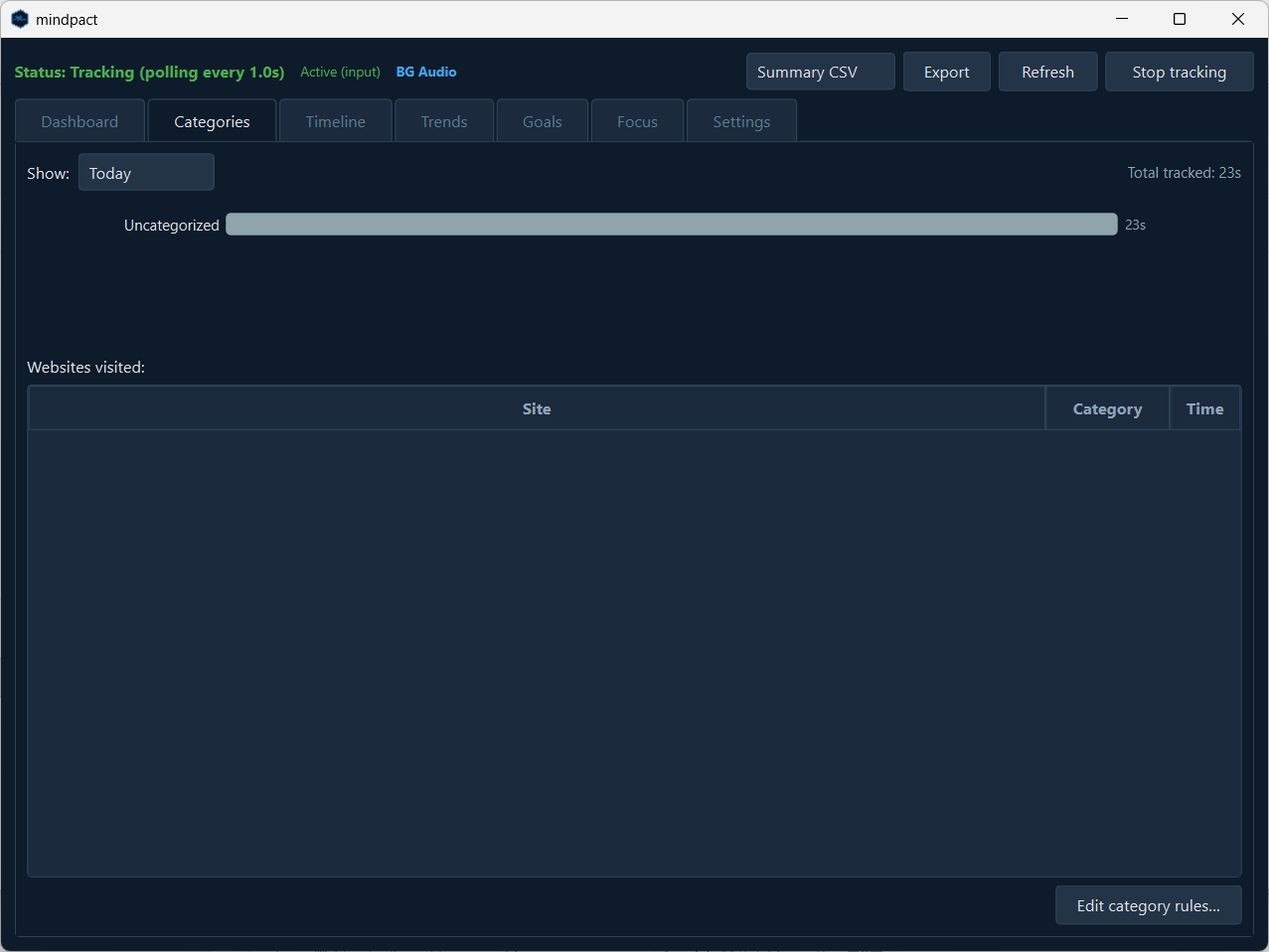
Automatically sorts your time into categories like Studying, Entertainment, Productivity, and Communication with customizable rules.
Productivity Score
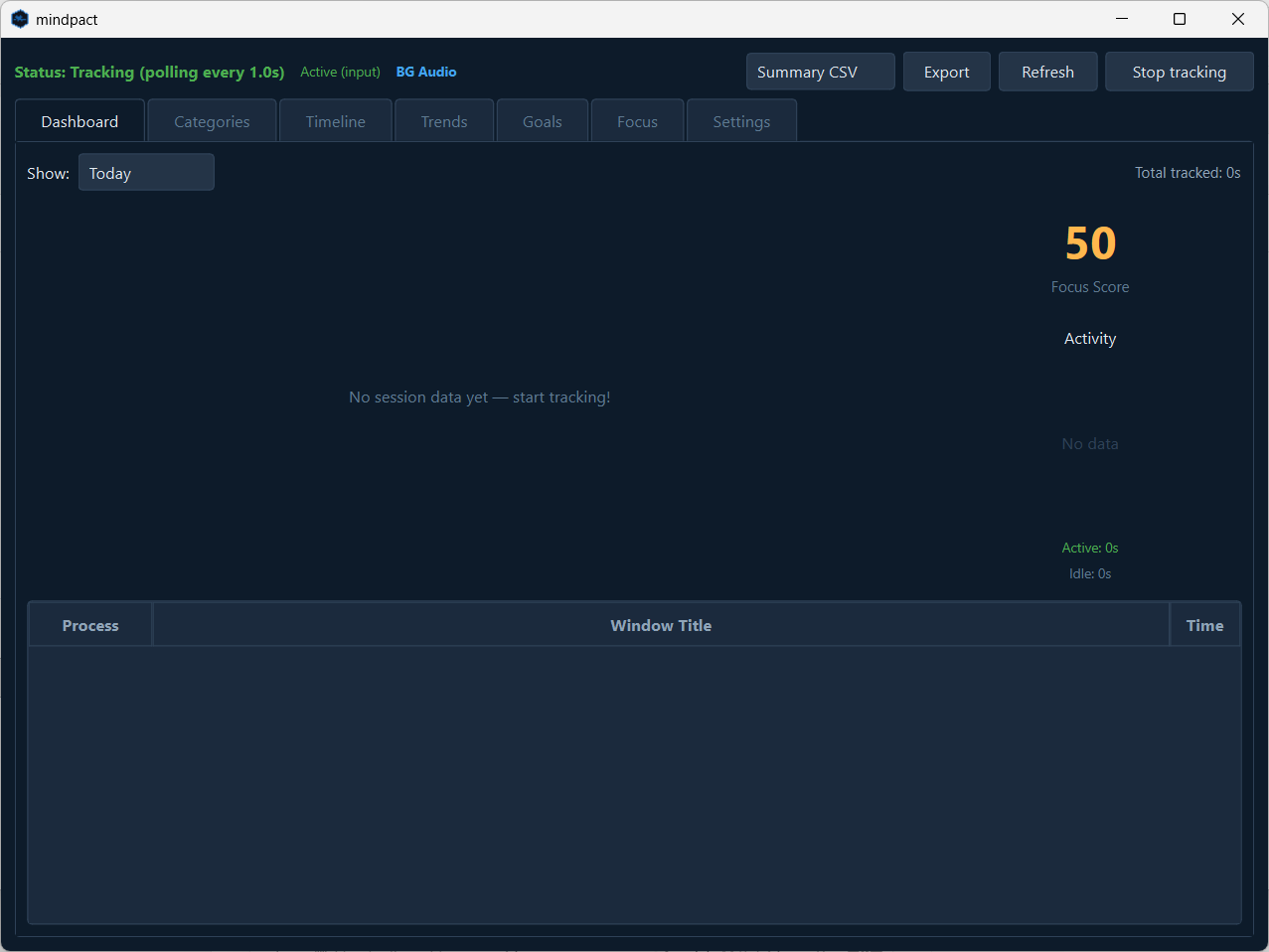
Get a daily Focus Score that reflects how you actually spent your time. See at a glance whether you're on track or drifting.
Focus Timer
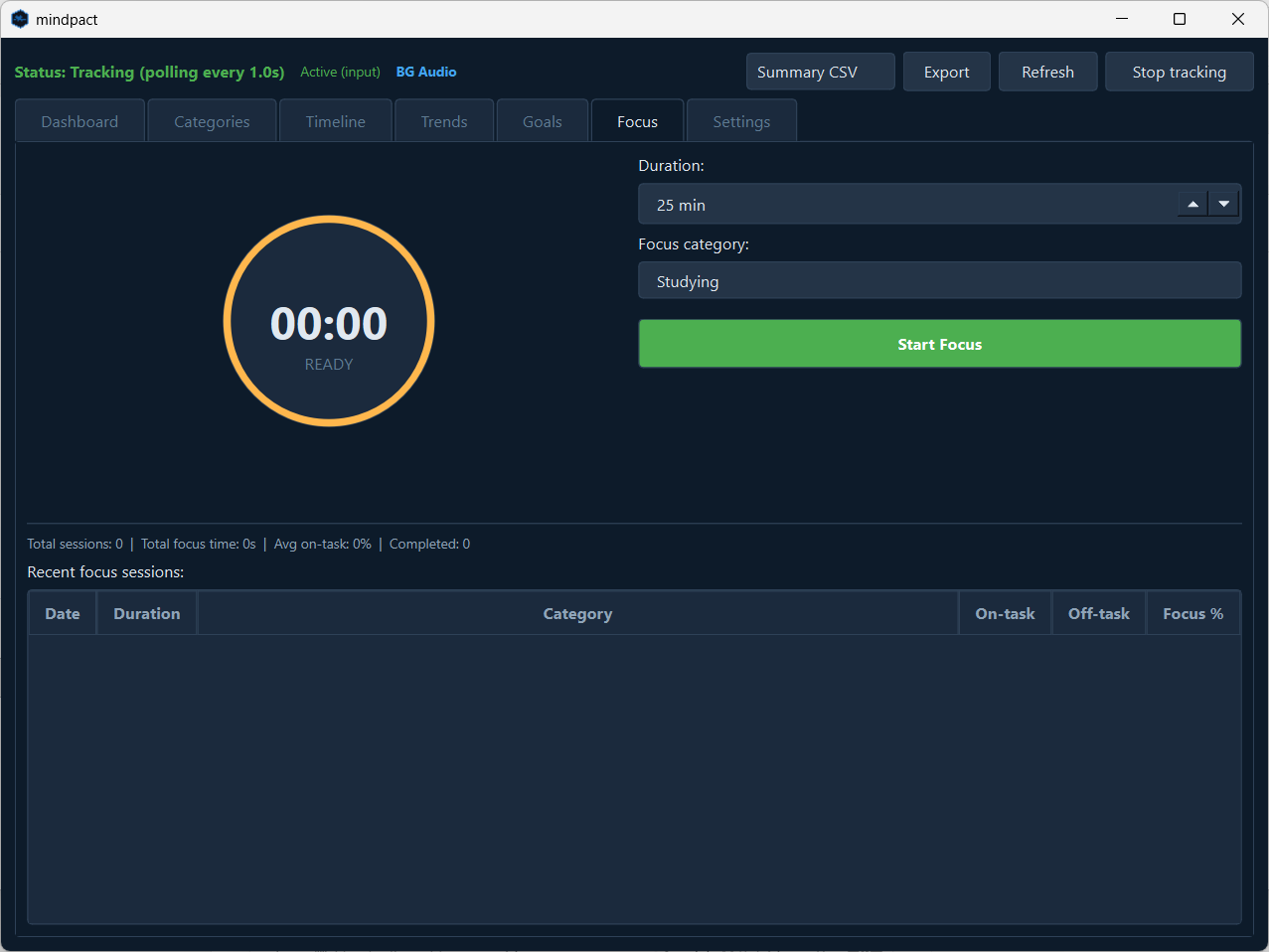
Built-in Pomodoro-style focus sessions. Set a duration, pick a category, and track how much time you actually spend on task.
Daily Goals
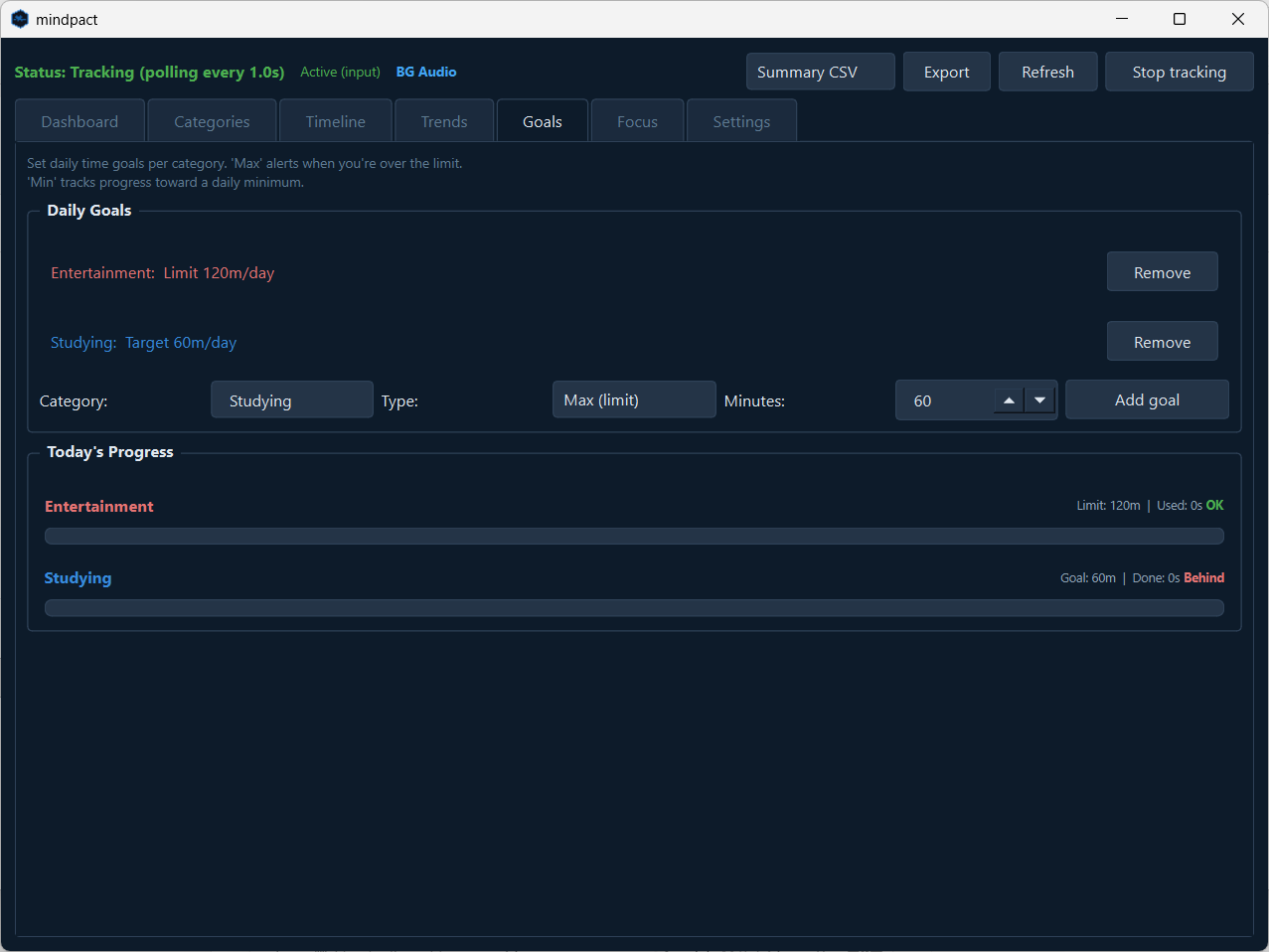
Set minimum targets for productive categories and maximum limits for entertainment. Get alerted when you go over — or fall behind.
Website & App Blocking Pro
Block distracting sites and apps at the system level — so the limits you set for yourself actually hold, instead of being one click away.
Focus Sessions with Blocking Pro
Start a session and mindpact blocks your chosen distractions for its full duration. Commit once at the start, then just work.
Project Time Tracking Pro
Group your tracked time by project to see where your hours really go across clients and initiatives.
Multi-Monitor Tracking Pro
Track activity across two displays at once, so nothing on your second screen slips by uncounted.
Inside the App
See exactly where your hours go
Clean dashboards. Real data. No guessing.
Track every process with per-second accuracy and a daily focus score
Automatic categorization of apps and websites with custom rules
Set min and max daily goals — stay accountable to yourself
Pomodoro-style focus sessions with on-task tracking
How It Works
Up and running in under a minute
1
Install
Download and run the installer. No account, no sign-up, no credit card. Just open and go.
2
Track
mindpact runs silently in the background, logging your apps and websites with audio-aware idle detection.
3
Improve
See your patterns. Set goals. Use focus sessions. Watch your habits shift — with data you can trust because you own it.
How We Compare
mindpact vs. the alternatives
Everything you need — without the subscription, the cloud, or the account.
Feature
mindpact
Cloud-based trackers
Manual time trackers
Open-source trackers
Automatic window tracking
✓
✓
No
Often
Audio-aware idle detection
✓
Usually no
No
Varies
Category classification
✓
Often
Manual
Varies
Daily goals (min + max)
✓
Limited
No
Varies
Focus timer
✓
Often paid
Often
Varies
Productivity score
✓
Often
No
Varies
100% offline / local data
✓
Usually cloud
Often
Often
No account required
✓
Usually no
Often
Often
Unlimited local history
✓
Plan dependent
Often
Often
Website & app blocking
✓ Pro
Varies
No
Varies
Price
Free tier + €39 once
Often subscription
Often free or one-time
Often free
Pricing
Try free. Upgrade once.
Start with the free tier for as long as you like. Unlock the full toolkit with a single Pro purchase — one-time. No subscription, ever.
Free
€0 to try
See where your time goes — the honest mirror, no strings attached.
Yes. The free tier lets you try mindpact for as long as you like: automatic tracking, smart categorization, dashboards, daily goals, a Pomodoro focus timer with on-task tracking, and productivity score. Pro is a one-time purchase that adds website & app blocking, focus sessions with blocking, project tracking, and multi-monitor tracking — no subscription.
No. mindpact is 100% offline. All your activity data is stored locally in a SQLite database on your computer. Nothing is ever transmitted to any server, cloud, or third party. There's no account creation, no login, and no telemetry. Your data never leaves your machine.
mindpact monitors three signals to determine if you're active: keyboard input, mouse movement, and system audio output. If you're watching a video lecture, a movie, or listening to music — but not touching your keyboard or mouse — mindpact detects the audio and counts that time as active. No other activity tracker does this.
mindpact is built around local-first tracking: no account, no cloud sync, and no data leaving your PC. It also combines automatic tracking with goals, focus sessions, and audio-aware idle detection.
The free tier covers tracking, categorization, dashboards, daily goals, the Pomodoro focus timer, and productivity score — enough to see exactly where your time goes. Pro is a one-time purchase that adds website & app blocking, focus sessions with blocking, project time tracking, and multi-monitor tracking (up to 2 displays).
mindpact currently supports Windows 10 and Windows 11. macOS and Linux support are on the roadmap.
It depends on your needs. mindpact is a strong fit if you want a Windows tracker that stays local, requires no account, and includes focus tools, daily goals, and productivity scoring — with website blocking and project tracking in Pro.
Ready to see where your time goes?
Start with the free tier — no account, no cloud, no strings. Upgrade to Pro once, whenever you're ready.